Print Directly on Your Happy Planner + FREE PDF Files!

Jul 26, 2018

**updated 11/02/2023 to include new links + video

Ooo!Ā  Do I have a treat for my fellow planner nerds today!Ā  I have a not-so-secret secret to share, and it’s that I still love using a pen + paper style planner for keeping my family’s schedule in.Ā  I don’t know why, but it’s easier for me to read, see and follow when I’ve written it down by hand.

I have tried PLENTY of planners at this point, but for the last few years I’ve been using a Happy Planner and I’m officially smitten.Ā  I have a need to customize things to fit my vision better, and all of the Happy Planner brand planners use a “discbound” style, where you can add pages, remove pages, and even remove the pages just so you can shove them into your home printer to print straight on them — like I’m about to show you!

If you’re extra like me, you probably follow one or two people on Instagram that have feeds full of pretty planners, full of stickers and washi tape and photos and and and……while those are pretty, it STRESSES ME THE CRAP OUT when I even attempt to make my planner pages look pretty and well decorated.Ā  I just can’t do it.Ā  It’s not in me.Ā  A planner should be a place to plan, not try and keep pristine.Ā  And yet, I still want some things nicer looking than my own handwriting.Ā  So for things like birthdays, holidays, and my weekly blog-a-long — having it printed for me just feels so much better.
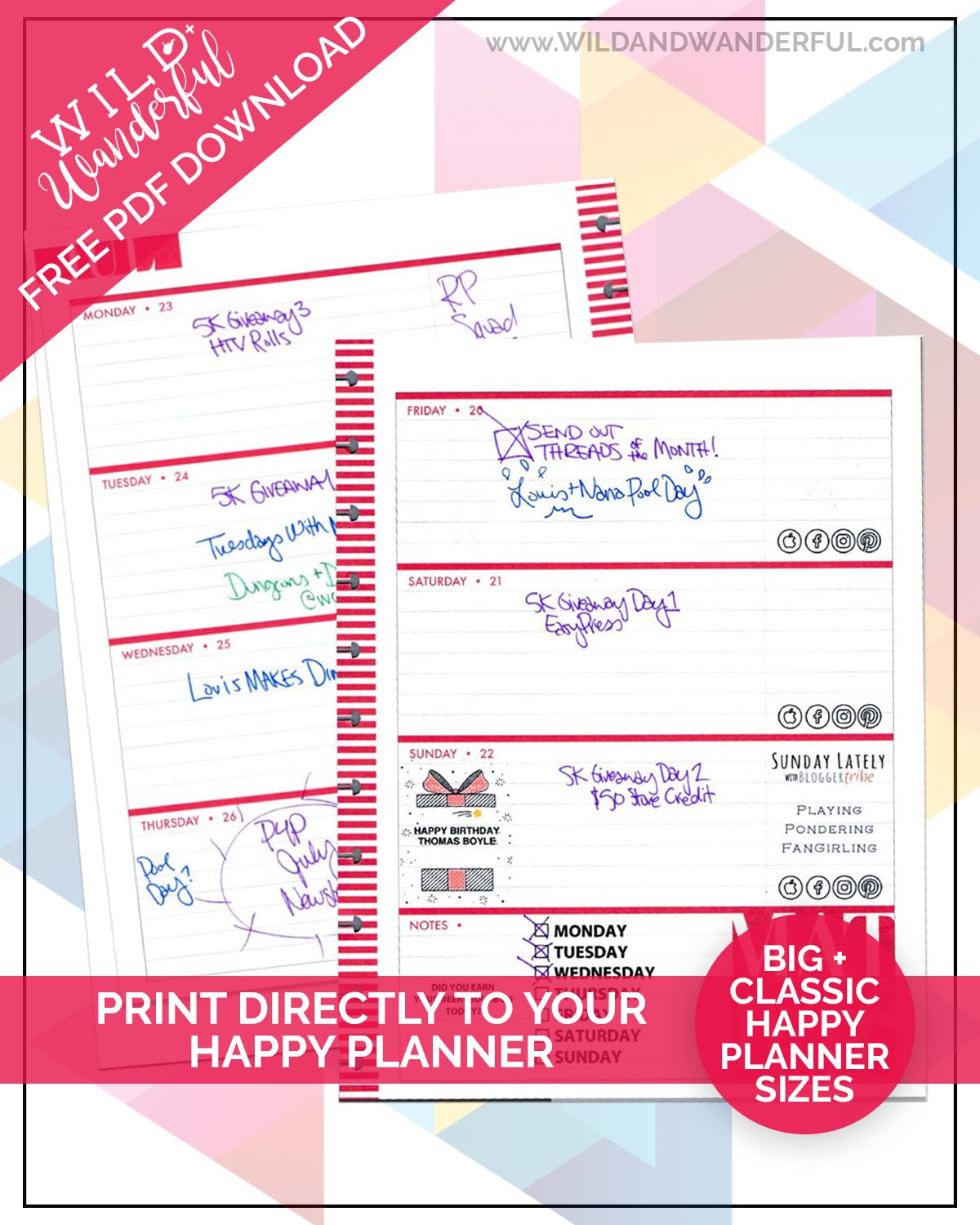
So.Ā  I’ve come up with a solution and I’m going to share it with you as well!Ā  Initially I’d been doing my printing using Photoshop but a lot of my friends don’t use/need that program.Ā  So I turned them intoĀ super simpleĀ pdf files that you can edit yourself, using the free Adobe Reader!

Better yet, I’m going to GIVE you something too!Ā  Here’s a quick video on how to use myĀ freeĀ PDF files, and then you can grab the downloadsĀ  right below it.

Quick Note: You’ll need to change your print settings for the “Classic Size” Happy Planner pages.Ā Set your page size to 7″(w) x 9.25″ (t) in order for everything to print properly.

The “Big Size” is your standard 8.5×11 letter sized paper and will print without any adjustments.

Happy planning, friends!
Disclosure: As always, you’ll find some affiliate links scattered within my post, which means I receive a small amount of compensation if you end up purchasing something I’ve recommended.Ā  Keep in mind that I link these companies and their products because of their quality and not because of the commission I receive from your purchases. The decision is yours, and whether or not you decide to buy something is completely up to you.Ā  Purchasing from my links does not alter the pricing in any way for you, it simply helps feed my sewing, creating and blogging habits.Ā  Thank you for your support!

17 Comments

  1. Teresa Kay Lam

    Thank you so much! I’ve been looking for something like this!

    Reply
  2. Mrs.J C

    Thank you..

    Reply
    • Katy McKinley

      They are supposed to be blank. These downloads are just built with fillable boxes that you can type in (or add a photo to on the third and fourth pages) so you can print directly onto the Happy Planner pages. The video above shows you how.

      Reply
  3. Melissa Pearson

    would you pretty please make one for the memory keeper too? I use my Big Memory keeper as my regular planner, I love the space it provides! I would love to have a template for it! Thank you for all that you do!

    Reply
  4. Melissa Marie

    Do you have a recipe template or can you point me in the right direction?

    Reply
  5. Amy

    I also got a memory keeper planner to log my progression from undergraduate to graduate school. Do you know if it is possible for you to make a template for the monthly pages as well? It would be so wonderful if you could!

    Reply
  6. Madison Robin

    I have tried everything to get that classic to print on my paper and it just won’t line up šŸ™

    Reply
  7. Alicia Orton

    how did you format your pictures so they are the perfect size to fit in these boxes? None of my photos are fitting correctly? Im working with a surface pro 3 computer on windows.

    Reply
  8. Antonia Garcia

    Hi Katy
    I uploaded the files using acrobat, which i have the full program. On page three i do not see the photo icon that shows in the video. I was able to upload a photo and as a test wanted to see if it would appear on either the first or second page and it didn’t show up. Can you please guide me? Thank you for doing what you do and thank you for helping all of us.

    Reply
  9. Jen Barvitskie

    Hello, Is there any way to do this for recipe planner? I am having a hard time trying to figure this out

    Reply
  10. Tessa

    Do you have the fitness template or can direct me to someone else?

    Reply
    • Katy M.

      Hi Tessa, sorry. I do not have a template for that.

      Reply
  11. Helen

    The downloads seem to have disappeared.

    Reply
    • Katy M.

      Hi there! There was something wrong with my plugin but the developer got me all straightened out and it should be working now. Thanks for the heads up!

      Reply
      • Helen

        Yup, was able to grab them! Thanks!

        Reply
  12. Hannah

    OMG. Thank you SO much. The stickers were not doing anything for me and this is EXACTLY what I needed and didn’t know it until I cam across this. I appreciate it so much!

    Reply
    • Katy M.

      I’m so happy that it’s going to be useful for you! šŸ™‚

      Reply

Trackbacks/Pingbacks

  1. PRINT DIRECTLY ON YOUR HAPPY PLANNER + FREE PDF FILES! | Faith and Family3 - […] I was looking online to see if anyone had a tutorial on how to actually print on the pages,and…

Leave a Reply to Antonia Garcia Cancel reply

Your email address will not be published. Required fields are marked *

Welcome to Wild+Wanderful!Ā  I’m Katy.
Momma. Wife. West Virginian.
Designer.Ā 
Dreamer.Ā Coffee Consumer.
DIY-er.Ā 
Craft Beer Enthusiast.
Purple Obsessor. Lover of Handmade.

MILDLY WILD.Ā MOSTLY WANDERFUL.

LATEST FREEBIES

Witchcraft :: FREE Silhouette + Cricut Halloween Cut File!

Spooky Season is officially in session, and I couldn't resist creating something special for my sewing + crafting besties. Well okay, I lied. I really made this for myself, but I'm sharing it with you too! So that counts for something, right? I originally made this...

Goldfish Plushie | Free Sewing Pattern (in 2 sizes!) + Video Tutorial

Snack time… but make it cuddly! I think these Goldfish Plushies are out-of-control adorable. I designed them after creating the for Patterns for Pirates a couple of Christmases ago, and they...

Gimme a T! | Free Triadelphia ā€œTā€ Mosaic Crochet Chart

When I finished this cardigan, I couldn’t stop smiling. It might be the proudest make of my crochet journey so far — bold, cozy, and packed with school spirit. And since I already had the charts all drawn up, I figured it would be a shame to keep them to myself. So...

Boo Crew Applique | FREE Sublimation Print + Sewing Pattern!

In case you didn't know, I'm a huge nerd for Halloween. But not in the scary, dark sense...completely in the spooky, cutesty version. I have an entire Halloween wardrobe that I pull out every October, and continue to add to. And this new Boo Crew Applique Sweater is...

Protect Trans Kids | November’s F4P, a Freebie Download + the New Judy Tee Pattern

I know I've been a broken record while talking about catching up on prior months' shipments, but I promise that I'm almost caught up! While I'm suuuuper duper late to the party with the...

Free Granny Sweater Ornament | Video Tutorial

Happy December 1, y'all! Let me tell you...my life has been a WHIRLWIND of adventures. I started a new career on November 4, and since then I've basically lost time due to new job training brain mush. The holidays SNUCK UP on me this year because of the timing of...

RECENT POSTS

Witchcraft :: FREE Silhouette + Cricut Halloween Cut File!

Spooky Season is officially in session, and I couldn't resist creating something special for my sewing + crafting besties. Well okay, I lied. I really made this for myself, but I'm sharing it with you too! So that counts for something, right? I originally made this...

Gimme a T! | Free Triadelphia ā€œTā€ Mosaic Crochet Chart

When I finished this cardigan, I couldn’t stop smiling. It might be the proudest make of my crochet journey so far — bold, cozy, and packed with school spirit. And since I already had the charts all drawn up, I figured it would be a shame to keep them to myself. So...

Gimme a T! | A Triadelphia-themed Mosiac Crochet Cardigan

When I say I’ve never been more proud of a make… I mean it. This cardigan might just take the cake. I designed and crocheted this Triadelphia-themed sweater for Bennett, and it’s giving alllllll the school spirit vibes. Honestly, if you ask me what my favorite thing...

AFFILIATES