
**updated 11/02/2023 to include new links + video
Ooo! Do I have a treat for my fellow planner nerds today! I have a not-so-secret secret to share, and it’s that I still love using a pen + paper style planner for keeping my family’s schedule in. I don’t know why, but it’s easier for me to read, see and follow when I’ve written it down by hand.
I have tried PLENTY of planners at this point, but for the last few years I’ve been using a Happy Planner and I’m officially smitten. I have a need to customize things to fit my vision better, and all of the Happy Planner brand planners use a “discbound” style, where you can add pages, remove pages, and even remove the pages just so you can shove them into your home printer to print straight on them — like I’m about to show you!
If you’re extra like me, you probably follow one or two people on Instagram that have feeds full of pretty planners, full of stickers and washi tape and photos and and and……while those are pretty, it STRESSES ME THE CRAP OUT when I even attempt to make my planner pages look pretty and well decorated. I just can’t do it. It’s not in me. A planner should be a place to plan, not try and keep pristine. And yet, I still want some things nicer looking than my own handwriting. So for things like birthdays, holidays, and my weekly blog-a-long — having it printed for me just feels so much better.
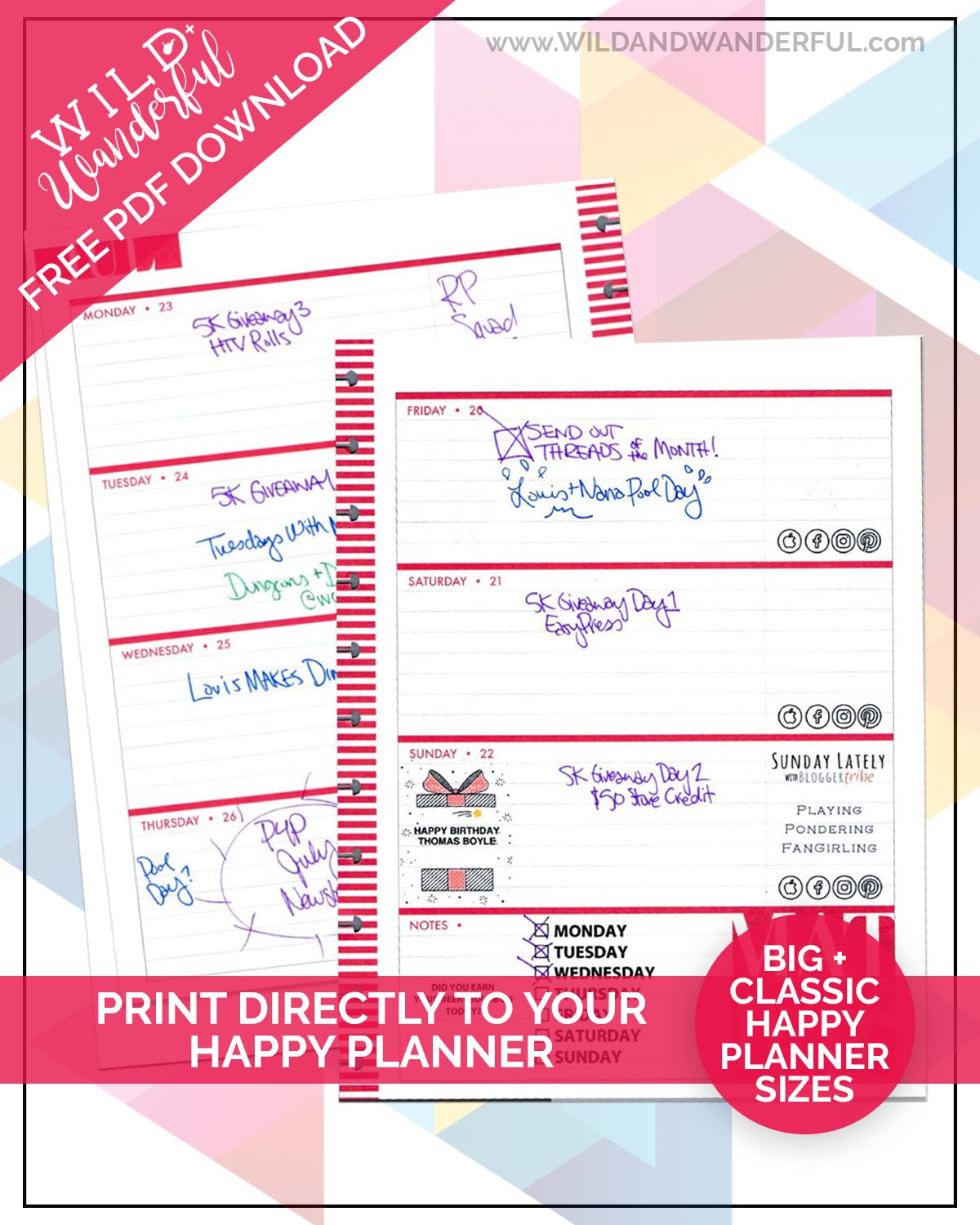
So. I’ve come up with a solution and I’m going to share it with you as well! Initially I’d been doing my printing using Photoshop but a lot of my friends don’t use/need that program. So I turned them into super simple pdf files that you can edit yourself, using the free Adobe Reader!
Better yet, I’m going to GIVE you something too! Here’s a quick video on how to use my free PDF files, and then you can grab the downloads right below it.
Quick Note: You’ll need to change your print settings for the “Classic Size” Happy Planner pages. Set your page size to 7″(w) x 9.25″ (t) in order for everything to print properly.
The “Big Size” is your standard 8.5×11 letter sized paper and will print without any adjustments.
Happy planning, friends!




Thank you so much! I’ve been looking for something like this!
Thank you..
They are supposed to be blank. These downloads are just built with fillable boxes that you can type in (or add a photo to on the third and fourth pages) so you can print directly onto the Happy Planner pages. The video above shows you how.
would you pretty please make one for the memory keeper too? I use my Big Memory keeper as my regular planner, I love the space it provides! I would love to have a template for it! Thank you for all that you do!
Do you have a recipe template or can you point me in the right direction?
I also got a memory keeper planner to log my progression from undergraduate to graduate school. Do you know if it is possible for you to make a template for the monthly pages as well? It would be so wonderful if you could!
I have tried everything to get that classic to print on my paper and it just won’t line up 🙁
how did you format your pictures so they are the perfect size to fit in these boxes? None of my photos are fitting correctly? Im working with a surface pro 3 computer on windows.
Hi Katy
I uploaded the files using acrobat, which i have the full program. On page three i do not see the photo icon that shows in the video. I was able to upload a photo and as a test wanted to see if it would appear on either the first or second page and it didn’t show up. Can you please guide me? Thank you for doing what you do and thank you for helping all of us.
Hello, Is there any way to do this for recipe planner? I am having a hard time trying to figure this out
Do you have the fitness template or can direct me to someone else?
Hi Tessa, sorry. I do not have a template for that.
The downloads seem to have disappeared.
Hi there! There was something wrong with my plugin but the developer got me all straightened out and it should be working now. Thanks for the heads up!
Yup, was able to grab them! Thanks!
OMG. Thank you SO much. The stickers were not doing anything for me and this is EXACTLY what I needed and didn’t know it until I cam across this. I appreciate it so much!
I’m so happy that it’s going to be useful for you! 🙂